Hello group!
Do you remember that a few weeks ago I showed you how to make a storytelling? Well, this time I have used this resource again to do a group work with Jaime, Alba, Ramón and Pedro. The 5 together we have worked to create a Video Challenge Storyboard and introduce "People's Rights" to children through this project.
Throughout the activity we have used different tools for each of the parts that compose it.
We started writing a script to be able to organize all the ideas we had in mind and translate the information we wanted to get to the children. For the script we have used Google Doc, then I embed the script so you can see what it is about and how we have approached the subject that you can see later in a new blog post !!
After making the script, the next step was to tell the idea of the video with images, for this we have created a storytelling with Pixton, it is simple and simple because our idea is that as a final project, the students, once they have seen the video, be able to add dialogue to the images.
The main goal that we want to achieve with children is that they learn what the rights of the people are so that later they can carry out an investigation about the rights, however, this time they have to do it on the rights of the children.
Hope you like it!!
Bea

Thursday, 26 April 2018

Webinar - Online Learning and Digital Educational Competence
Hi again, everybody!!!
Do you want to learn new ways to use digital competence but do not have time? Would you like to continue training but without having to go to class? Have you always wanted to do a gamification course, ABP or similar but are expensive and do not have money to do all those courses?
Well I bring you the solution, these weeks that I have not published anything (lately, I have a lot of work) I've been thinking how could help you improve your resume without having to go to college, studying at your own pace and, also, for free .
I found the solution in a webinar on "Online Learning and Digital Educational Competence" (online) last Tuesday thanks to one of my professors from the University who taught it and gave us the opportunity to attend.
Then I will summarize what it consisted of and all the necessary information about the different online courses offered.
The webinar was given by Maria Jesús García San Martín, Head of the Area of Training in Network and Social Networks in the National Institute of Educational Technologies and Teacher Training (INTEF), you can follow her on her Twitter (@mjgsm)
The session began with the speaker explaining that INTEF proposes a new path for online teacher training, which adapts to working time and the interests of learners. This new online training is known as "Aprende INTEF", María Jesús defined it as a learning puzzle because each course works in a digital competition and they join in the portfolio which would be the puzzle.
"Aprende INTEF" is composed of a wide variety of resources, it is rare that someone does not find something that suits their needs because "Aprende INTEF" is designed so that we can all continue to train.
María Jesús continued explaining each of the resources that make up this puzzle. Next, I am going to explain briefly explain each of them:
- EduPills is an application aimed at teachers, it can be used on any digital device although it is recommended that it be used on the mobile phone or on ipad. EduPills's main objective is for teachers to develop their skills in digital competence quickly and easily. They can be done in any free time you have because they do not require more than 15-20' each pill.
- MoocIntef consists of an open learning where collaborative work is the star element. MoocIntef provides a wide variety of online courses where, apart from developing digital skills, the professional component is also developed. The courses require an average of 5 hours per week of work, the duration of the courses varies from 4 to 5 weeks depending on the subject. Some of the courses that can be found in MoocIntef are: gasification in the classroom, virtual reality in education, project-based learning, etc.
- NoonIntef was presented by Maria Jesus as Nano courses which have as a function the learning of mass, it lasts between 160-180 minutes each, equivalent to 1 week. These courses deal with topics of great relevance to teachers and go directly to important information such as designing a digital collaborative project, visualize thoughts and ideas, solve with creativity and even learn to program a game through applications.
- SpoocIntef are online courses that facilitate their realization since time and rhythm is marked by each learner.
These are some of the many possibilities that INTEF provides to teachers to continue expanding their training, they are the most interesting because they are very different between them not only in topics but also in the time they entail, a very different aspect in comparison with other organizations that usually have courses of very similar duration and, in addition, do not offer them for free.
However, if you do not want to be overwhelmed with the time of work that usually leads to online courses, INTEF offers a space called "En Abierto" through which offers courses other calls that currently have no access limit / realization.
The completion of these courses does not provide an official accreditation with credit but they do give a certificate of having completed the course and a digital competition badge. The badge is very useful because it can be added to another of the resources that INTEF gives a lot of importance to is the "Portfolio" which currently does not have a recognition of punctuation and accreditation as it happens for example with the languages but, as I mention María Jesús, the date of recognition of the digital competence is not only getting closer not only in the Curriculum Vitae but also in the scores of the Public Exams.
- Webinar - https://www.il3.ub.edu/es/servicios_empresas/agenda_empresa/eventos/webinar-aprendizaje-linea-competencia-digital.html
- Webathon - 4th Webathon on Digital Educational Experiences
To finish, I would like to add that having attended this Webinar has helped me to know new ways to continue training as a teacher knowing that I have many possibilities to continue doing without having to pay exorbitant prices like those that can be found in many academies and / or universities. Once I finish the master that I am doing I intend to take advantage of the opportunity offered by INTEF because it seems very interesting and attractive.
I encourage you to visit the website of INTEF and do their courses, they are very interesting and I am sure that you can find one that suits your interests and needs.
I hope you liked it and the information is very useful!
BEA :D
Thursday, 12 April 2018
Reading Forum with ICT
Hi everyone!!!!
With the end of the course very close and thinking about new ideas for the school year 2018/2019, I have decided to organize a language workshop to work on reading with students in a new way. The workshop will not be just for reading, ICT will also be used and students will be able to participate not only in the school schedule but also from home.
To organize the project I have created a document with Google Doc, a very useful tool that allows to design word documents, excel, presentations, maps and even drawings from a website. In addition, with this tool you can work with other people in the same document and time without having to be in the same place, simply share the file and each one makes the modifications from your computer/laptop. To be able to work with Google Doc you need a Gmail account. Next, you can visualize the project:
As you can see in the Google Doc, the project is based on creating a reading forum in which 3 students at the beginning of the week will make a Podcast with the text or poetry they have chosen so that the rest of their classmates can hear it and must give their opinion and make a debate on different aspects such as: theme of the texts, authors, tips to improve reading, recommendations, etc. The rest of the classmates will also use the Podcast tool to respond to the classmates who have shared the text.
Once the students have recorded their Podcasts they should share them with the rest of the class through the project website with Soundcloud.
To start the project and bring students to the Podcasts, I have created a welcome message through the Garage Band App. An easy to use tool although with the disadvantage that only those who have iOS devices (Apple) can use it (to record the audio). Then, I shared the welcome podcast in Souncloud.
In order to perform a more motivating work, I have created three playlists, each of them intended for each moment of the sessions. The first one called "We concentrate" contains music destined for concentration, the second playlist is called "Mix - Reading Forum" because with it the students will listen to different styles and, finally, the third playlist is "Back to the calm", this list is composed of relaxing music that will sound in the last 5-10 minutes while students collect. I divide the class into different playlists because as the course progresses, students will recognize in which part of the workshop they are simply listening to the music. They could add songs.
I hope you like it!! :D
With the end of the course very close and thinking about new ideas for the school year 2018/2019, I have decided to organize a language workshop to work on reading with students in a new way. The workshop will not be just for reading, ICT will also be used and students will be able to participate not only in the school schedule but also from home.
To organize the project I have created a document with Google Doc, a very useful tool that allows to design word documents, excel, presentations, maps and even drawings from a website. In addition, with this tool you can work with other people in the same document and time without having to be in the same place, simply share the file and each one makes the modifications from your computer/laptop. To be able to work with Google Doc you need a Gmail account. Next, you can visualize the project:
As you can see in the Google Doc, the project is based on creating a reading forum in which 3 students at the beginning of the week will make a Podcast with the text or poetry they have chosen so that the rest of their classmates can hear it and must give their opinion and make a debate on different aspects such as: theme of the texts, authors, tips to improve reading, recommendations, etc. The rest of the classmates will also use the Podcast tool to respond to the classmates who have shared the text.
Once the students have recorded their Podcasts they should share them with the rest of the class through the project website with Soundcloud.
To start the project and bring students to the Podcasts, I have created a welcome message through the Garage Band App. An easy to use tool although with the disadvantage that only those who have iOS devices (Apple) can use it (to record the audio). Then, I shared the welcome podcast in Souncloud.
In order to perform a more motivating work, I have created three playlists, each of them intended for each moment of the sessions. The first one called "We concentrate" contains music destined for concentration, the second playlist is called "Mix - Reading Forum" because with it the students will listen to different styles and, finally, the third playlist is "Back to the calm", this list is composed of relaxing music that will sound in the last 5-10 minutes while students collect. I divide the class into different playlists because as the course progresses, students will recognize in which part of the workshop they are simply listening to the music. They could add songs.
I hope you like it!! :D
Thursday, 22 March 2018
Adjectives through an infographic
Hello everyone!!!
Today, I would like to explain how we can explain the contents to the students through the Infographics. This resource is used to explain concepts or steps. What differentiates it from other resources is that it uses interactivity to expand the information and not lose the visual component, a very important aspect in the learning process.
In order to make infographics we have a wide variety of free websites that provide us with all the necessary elements (images, interactivity botnets, templates, different types of text ...) to create them with a simple learning guide.
Despite having such variety, I have found quite a lot of difficulties when doing the infographic because my initial idea was to use a new tool such as Easel.ly or Piktochat but in both cases I found a problem when modifying the text and adding images. In addition, they were very slow and that made it difficult for them to carry out the work at a normal pace. For these reasons, and some others, I finally decided to use Genial.ly, since I had previously used it to make a Slideshow.
With Genial.ly I have not had any kind of difficulty, it's easy, intuitive and, in addition, the wide variety of templates with which account makes it possible to design a personalized infographic.
Without any doubt, I will include this tool (Genial.ly) and resource (infographics) to my day to day as a teacher because I have seen that it is very useful not only for me as a teacher when explaining a content but also for students in his learning by clearly visualizing each of the aspects that comprise it.
Then, I leave the infographic that I have done on the Degrees of comparison of the adjectives, it is recommendable its use for 4th or 5th of Primary Education.
Hope you like! See you again soon here! : D
Today, I would like to explain how we can explain the contents to the students through the Infographics. This resource is used to explain concepts or steps. What differentiates it from other resources is that it uses interactivity to expand the information and not lose the visual component, a very important aspect in the learning process.
In order to make infographics we have a wide variety of free websites that provide us with all the necessary elements (images, interactivity botnets, templates, different types of text ...) to create them with a simple learning guide.
Despite having such variety, I have found quite a lot of difficulties when doing the infographic because my initial idea was to use a new tool such as Easel.ly or Piktochat but in both cases I found a problem when modifying the text and adding images. In addition, they were very slow and that made it difficult for them to carry out the work at a normal pace. For these reasons, and some others, I finally decided to use Genial.ly, since I had previously used it to make a Slideshow.
With Genial.ly I have not had any kind of difficulty, it's easy, intuitive and, in addition, the wide variety of templates with which account makes it possible to design a personalized infographic.
Without any doubt, I will include this tool (Genial.ly) and resource (infographics) to my day to day as a teacher because I have seen that it is very useful not only for me as a teacher when explaining a content but also for students in his learning by clearly visualizing each of the aspects that comprise it.
Then, I leave the infographic that I have done on the Degrees of comparison of the adjectives, it is recommendable its use for 4th or 5th of Primary Education.
Hope you like! See you again soon here! : D
Tuesday, 20 March 2018
Mind Maps in Education!
Hello friends!!
I'm here again! Today I would like to teach you how to explain the parts of an educational project through a way characterized by being very visual, practical, easy to understand and easy to perform ... This way is... the mental maps!
Mind maps help us spatially order the information, ideas, knowledge and thoughts that we are going to work on. From my point of view they are a very useful resource for students to learn in a different and visual way.
In this case, I am going to show you my mental map about the "ecosystems" project aimed at 5th grade students of Primary Education.
In order to design this mental map I used the Coogle application. Previously I had made mental maps with the text editor of the computer and with applications directed for tablets but in the first case I had to spend a lot of time to do it and in the second they were very simple and they gave failures continuously.
In the case of Coogle, it has been easy for me to learn how to use it, not only because of the guide shown on the right hand side of the screen when you start to make the mental map but also because it is very intuitive. Although, I have to admit that the limitations of the free trial cause that you can not design as you want because many functions are limited, such as changing the color of the lines, the letter (font and placement), adding the frame to text boxes, etc. This along with the display of images that is too small in my opinion are the two aspects that I like least about Coogle.
Through the use of this source I have learned to improve in the making of mental maps and also in how the ideas should be shaped and connected to show the rest of the people the fundamental parts of the project without having to delve into it with long sentences simply with keywords.
Then, I leave the example I have done to explain the project that I said at the beginning of this post.
Hope you like it!! :D
 |
| The Ecosystem Project by Beatriz Pedrazuela with Coogle |
Monday, 19 March 2018
Learn with comics
Hello everyone!
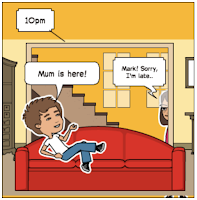
Today I would like to share a new digital tool to make teaching material. In this case, it's Pixton. It's the first time I used it and I thought it was very good. My first project with Pixton has been a comic explaining a situation in which many children find themselves today.
The use of Pixton is very simple and intuitive, to be able to use it you have to register, it is free for a month but then if you want to continue using it you have to pay monthly.
Through this tool you can add any character, customize your clothes, gestures and body position. In addition, you can also change the backgrounds of each vignette individually, add text, props, audios and even links.
After having made my comic, I will use it in class with my students (5th grade), although it takes time to make each vignette, it is worth it because through this comic it is possible for many children to express how they feel sometimes or as something usual at home or at school.
So you can see my example of Pixton, then you can see the one I made:


Hope you like it!
"See" you soon!
Bea :D
Today I would like to share a new digital tool to make teaching material. In this case, it's Pixton. It's the first time I used it and I thought it was very good. My first project with Pixton has been a comic explaining a situation in which many children find themselves today.
The use of Pixton is very simple and intuitive, to be able to use it you have to register, it is free for a month but then if you want to continue using it you have to pay monthly.
Through this tool you can add any character, customize your clothes, gestures and body position. In addition, you can also change the backgrounds of each vignette individually, add text, props, audios and even links.
After having made my comic, I will use it in class with my students (5th grade), although it takes time to make each vignette, it is worth it because through this comic it is possible for many children to express how they feel sometimes or as something usual at home or at school.
So you can see my example of Pixton, then you can see the one I made:


"See" you soon!
Bea :D
Tuesday, 6 March 2018
Genial.ly - We are what we eat
Hi everyone!!!
Today, I would like to show you a new website composed of different digital resources very useful for teachers. Genial.ly is a tool to create presentations, similar to PowerPoint but with animations, designs and own stickers to include in each work, thus giving a more modern touch. With this page, you can create from simple presentations to infographics through posters, timelines, documents, thematic maps and postcards, among others. For examples:
Infographic Chronology


Teaching Resource
Below is the presentation I have made about feeding with these resources and through which I have learned how to access many of the spaces that Genial.ly has. I chose this type of resource because I think it is the most appropriate to "start" to use Genial.ly. Futhermore, I add a video exposing it briefly.
An aspect that I liked a lot of Genial.ly is its wide offer of predesigned templates for both free and premium edition. In addition, other resources such as adding audios through Spotify and Soundcloud or photos from different social networks, internet or stored on the computer.
It seems to be a simple, intuitive and similar resource to others like PowerPoint or Prezi but it requires a lot of time of inquiry and practice to learn how it works because it has infinite possibilities.
I spent several hours using this resource with which I have been learning something new every moment. I know it will not be the last time I use it because I still have a lot to learn about it and I would like to be able to improve little by little each job I do using it.
I hope you love to try it!
Thank you for your visit! :D
Subscribe to:
Posts (Atom)
The end comes...
Hi everyone!! In this post I am going to show you my final project (artifact). Until the last moment I did not know how making my artif...

-
 Hello friends!! I'm here again! Today I would like to teach you how to explain the parts of an educational project through a way ch...
 -
 Illustrated by OpenSax College Creative Commons Attributed 3.0 Unported (CC By 2.0) Hi everyone!! How are you? Today, I am us...
 -
Hi everyone!!!! With the end of the course very close and thinking about new ideas for the school year 2018/2019, I have decided to organi...